
For my first article, let me share how I offloaded the arduous, manual process of aggregating and summarizing industry news for my newsletter to AI — specifically using Claude Code. Throughout the article, I will also share some of the issues I faced and key takeaways.
In my role as a research associate, I am required to produce a biweekly newsletter to keep subscribers and our company's LPs abreast on the latest industry developments. Prior to using AI tools, I had to gather news from various Telegram channels and websites, filter out important developments to share, and summarize them into one sentence attached with the link to the information source.
This process, though seemingly simple, requires one to be extremely disciplined in recording down important news and developments on a daily basis — else when news piles up, there is a lot of catching up to do. This is the problem I faced, so I decided to use AI to help me with my newsletter. The rapid updates of AI models today underscore the increasing breadth and depth of AI capabilities, and summarization, being one of the earliest capabilities they are able to do, has only gotten much better. I chose Claude Sonnet 4.6 because it is fast, cheaper than Opus 4.6, and also has a long context window.
Task Requirements
- Gather information from various credible news websites via RSS feed. Gather information from public Telegram channels that I joined. Exclude price action discussion and focus on fundamental ecosystem developments and news.
- Deduplicate news across various news channels. Summarize the consolidated list of news.
- Output it into Google Docs. (You can also ask it to output elsewhere such as Notion, email draft, markdown file, etc.)
With task requirements ironed out — by sharing all the credible news sources and Telegram channels I rely on for work — Claude gave me a clear architecture of how my bot would be designed.
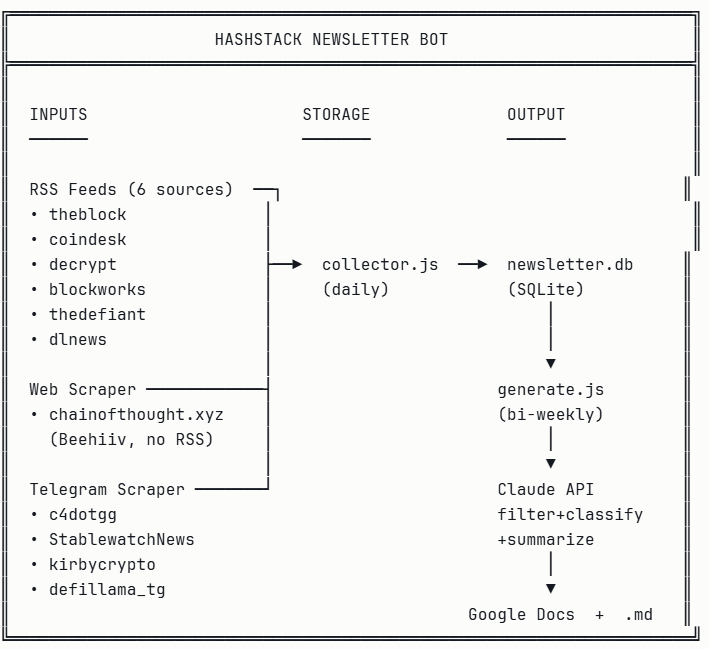
What I Had to Provide
- Links to Telegram channels
- Google OAuth client ID and secret (from Google Console Platform) and Google OAuth access and refresh tokens
- Claude Console API keys
- Access to Google Drive API and Google Docs API
With all the information and resources provided, Claude then goes off on its own to create the relevant folders and files. This is the part where I am hands-off and give Claude Code full ownership.
My Claude is also using Sonnet 4.6 — which is fast, cheaper than Opus, and has long context windows — making it suitable to handle many articles in one call. During the building phase, several issues surfaced, such as the Beehiiv platform being on a free plan and thus lacking an RSS feed. Claude was smart enough to find workarounds for this.
Integration Phase
-
On Google Console Platform, I created a new project and enabled Google Drive and Google Docs API access. To ensure Claude only has narrow access, you can tell Claude to use
drive.file.
Configuring Google Drive API scope to drive.file for narrow access -
Set up a Windows Task Scheduler. It automatically runs
npm run collectevery morning so that my database is always fresh with the past 14 days of news.
Every 2 weeks, I just need to run npm run generate and Claude Code will read the past 14 days of consolidated news, filter, deduplicate, classify, and summarise. Just like that, my work setup is automated.
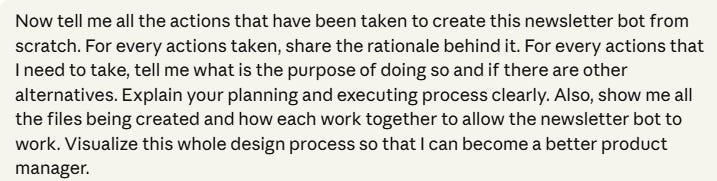
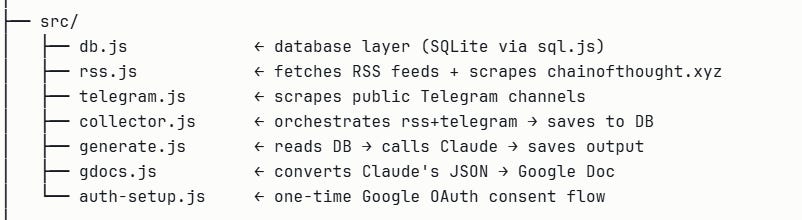
The screenshot below shows the modular roles of each file in the resulting project:
The Differentiator
While newsletter creation can now be automated, what sets one newsletter apart from another still heavily relies on the creator. Many newsletters simply provide market updates. I instructed Claude to add sections that I typically care about — such as fundraising details and portfolio company developments. My output will naturally differ from others depending on the target audience, so providing Claude with context on your newsletter's target audience will also help it better aggregate and filter news.
Was it Fully Automated?
Nope. Even with the full draft created, some of the content can be tightened for accuracy. Claude is already doing an exceptional job of processing information, but given the cap on context windows, providing more information sources and a longer scraping period can cause a slight decline in accuracy — which means I still need to vet through the output.
But overall, Claude has offloaded a large part of the work and kept content accuracy high, which now allows me to put most of my time into further filtering news and verifying content rather than gathering it.